
Quick Filters
Build custom filters in Subject Management to search for subjects and encounters by date, status, or variable value.
Role required: Project Management
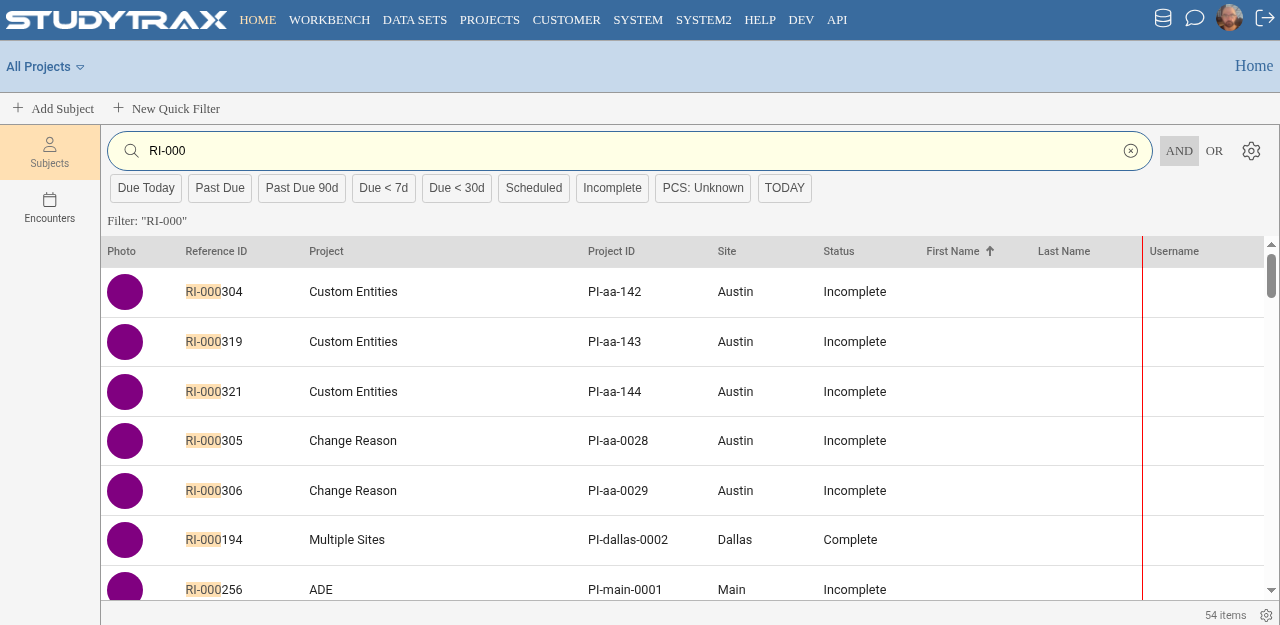
Create a quick filter
- Sign in at https://my.studytrax.com.
- Open the project.
- On the Home page, select New Quick Filter.
- Enter a name and expression.
- Save.
Expression syntax
Quick filter expressions use SQL-like syntax with variables prefixed by #. Combine multiple conditions with AND / OR.
Parameterized filters
Use PARAM to prompt for a value when the filter runs. Without PARAM, the filter uses a fixed value.
| Pattern | Behavior |
|---|---|
#EncounterDate = PARAM(#EncounterDate, "Date") | Prompts for an exact date |
#ReferenceID ~= PARAM(#ReferenceID, "Search by Reference ID") | Partial match (contains) |
#SiteCode = PARAM(#SiteCode, "Site") | Dropdown shows site names |
Use ~= for partial matching (contains). Omit ~= for exact match—useful for dropdowns like sex or diagnosis.
Set a default width with width= in the PARAM options.
Date functions
| Function | Example | Result |
|---|---|---|
DATE(year, month, day) | #EnrollmentDate > DATE(2024, 1, 1) | After Jan 1 2024 |
TODAY | #EnrollmentDate = TODAY | Today's date |
DATEDIFF(unit, start, end) | DATEDIFF(day, #EnrollmentDate, TODAY) <= 30 | Enrolled in last 30 days |
DATEPART(part, date) | DATEPART(year, #ScreeningDate) = 2024 | Screened in 2024 |
Date arguments use numeric month (1–12), numeric day, and four-digit year.
Completion status filters
Filter for incomplete encounters or subjects.
| Variable | Values |
|---|---|
#EncounterCompletionStatus | 0 = incomplete, 2 = complete |
#ProjectSubjectCompletionStatus | 0 = incomplete, 2 = complete |
#AggregateCompletionStatus | 0 = incomplete, 2 = complete |
Example: #EncounterCompletionStatus = 0 returns encounters missing required data.
Search by variable
| Variable | Example |
|---|---|
#ReferenceID | #ReferenceID ~= PARAM(#ReferenceID, "Reference ID") |
#ProjectID | #ProjectID = PARAM(#ProjectID, "Project ID") |
#SiteCode | Dropdown shows site names |
#LastName | #LastName ~= PARAM(#LastName, "Last Name") |
#dob | #dob = PARAM(#dob, "Date of Birth") |
For pick-list variables (sex, diagnosis), use PARAM without ~= to show a dropdown.
Due-window filters
Find encounters due within a window or not yet occurred.
| Scenario | Expression |
|---|---|
| Due in next 7 days | DATEDIFF(day, TODAY, #CalculatedDueDate) <= 7 AND DATEDIFF(day, TODAY, #CalculatedDueDate) >= 0 |
| Past due | #CalculatedDueDate < TODAY AND #EncounterDate = "NULL" |
| Not yet occurred | #EncounterDate = "NULL" |
| Created in past 30 days | #EncounterDate != "NULL" AND DATEDIFF(day, #EncounterDate, TODAY) <= 30 |
Related variables: #CalculatedDueDate, #ScheduledDate, #DueDate.
Search behavior
The search box accepts space-separated tokens. Each token must appear somewhere in the field.
Example: typing ho er matches a name containing those two substrings (like "Homer" or "John Hoerner"). Wildcards are not needed.
Related
- Subjects — navigate Subject Management
- Run reports — due lists and data completion
- Export — Data Sets filters use similar syntax